
Sales reps spend 65% of their time on activities that aren’t selling.
Data entry. Follow-up scheduling. Pipeline updates. Activity logging. Moving leads from one stage to another because a conversation happened. Every one of these tasks is necessary for the system to work, and none of them require a sales rep to do them.
CRM automation transfers all of that administrative work to the system and gives the time back to the people who should be using it to close.
What CRM Automation Actually Automates
The word “automation” is overused. So here’s what it means in practice, with specific examples.
Lead Capture and Enrichment
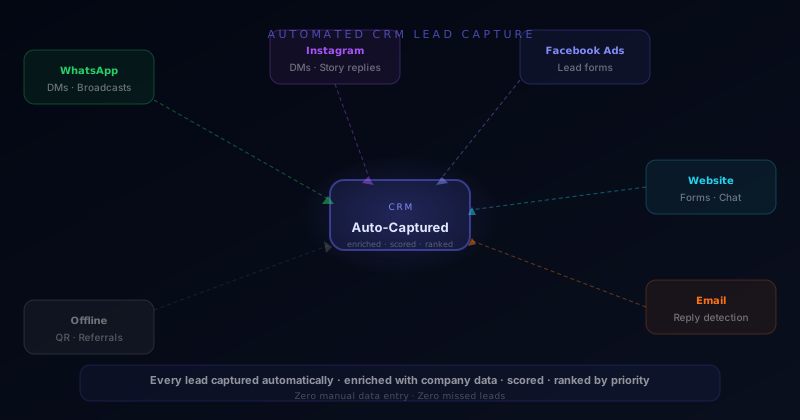
Every new lead, from an ad, a web form, WhatsApp, Instagram DM, or a referral, is created as a contact record automatically. No rep manually enters a name, phone number, or source. The system captures it and enriches it immediately: job title, company size, social profiles, and any behavioral data from the capture event.
A rep checking their morning queue doesn’t start the day by creating contact records. They start it by reviewing leads that are already in the system, already enriched, and already ranked by priority.
Deal Stage Progression
Deal stages in most CRMs are manually updated. A rep has a qualifying call, decides the lead is promising, and then opens the CRM to drag the lead from “New” to “Qualified.” That action happens sometimes, when the rep remembers, between other tasks.
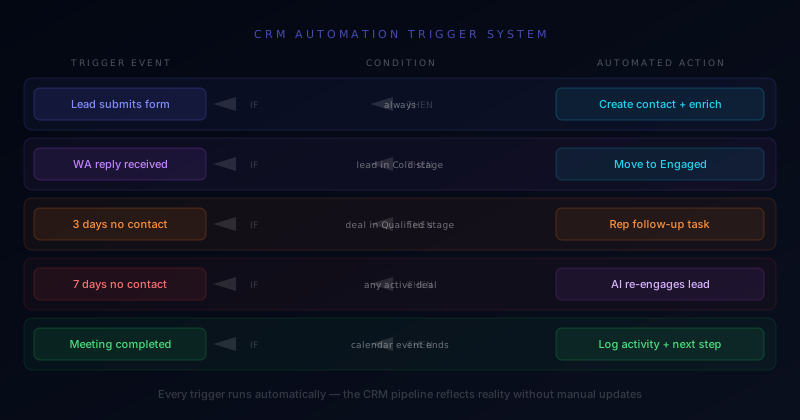
Automated stage progression moves the lead based on defined triggers. A lead who completes the qualification conversation moves from “New” to “Qualified” automatically. A lead who books a demo moves to “Demo Scheduled” the moment the calendar event is created. A lead who doesn’t respond for 14 days moves to “Needs Follow-up” and triggers a task for the assigned rep.
The pipeline reflects reality in real time without anyone manually maintaining it.
Follow-up Trigger System
The most common reason deals stall is that the follow-up didn’t happen. Not because the rep decided not to follow up, but because they got busy, the task got buried, and the lead waited until they either found a competitor or forgot they were interested.
Trigger-based follow-up eliminates this by defining what happens automatically when a deal sits inactive:
- Day 3 of inactivity: Rep receives a follow-up task with the last conversation summary
- Day 7 of inactivity: AI Agent sends a re-engagement message to the lead
- Day 14 of inactivity: Lead moves to a long-term nurture sequence
- Day 30 of inactivity: Broadcast re-activation message sent to the lead’s WhatsApp
Every deal in your pipeline has a defined action plan that executes without anyone needing to remember.
Activity Logging
Every call, message, meeting, and email is logged automatically. No rep spends time typing call notes into a CRM after a conversation. Call recording integrations transcribe and summarize calls. WhatsApp and email integrations log every message. The CRM becomes a complete record of every interaction without any rep input.
This isn’t just efficiency. It’s institutional knowledge. When a rep leaves or a deal changes hands, the full history is there.
The Pipeline Visibility Problem
Most sales leaders don’t have a real picture of their pipeline. What they have is whatever their reps most recently updated, which is an incomplete and often optimistic view of reality.
CRM automation produces an accurate pipeline because the data is captured from system events, not rep memory. If a lead hasn’t been contacted in 10 days, the CRM knows, because the last WhatsApp message was 10 days ago, the last call was 14 days ago, and no meeting is scheduled. The lead shows as at-risk automatically, before the deal is already lost.
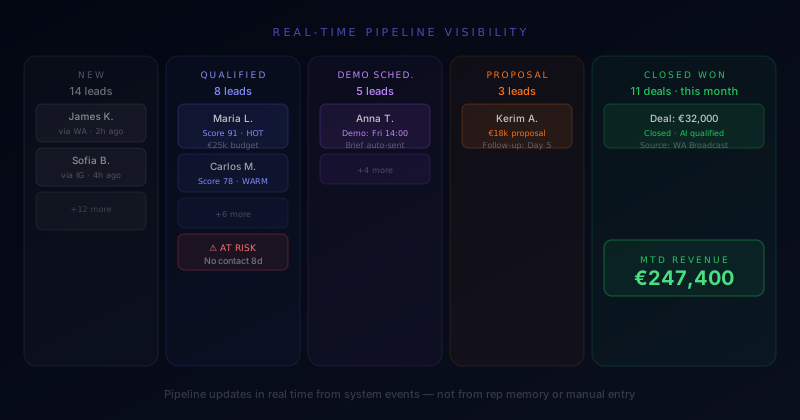
Accurate pipeline data produces better forecasting, better coaching, and faster identification of deals that need attention. A sales manager who can see which deals are actually at risk, not which ones a rep thinks are at risk, can intervene earlier and with more precision.
The Integration Layer
CRM automation works when the CRM is connected to every channel where conversations happen. A CRM that requires manual data import from WhatsApp is not automated. It’s just delayed manual work.
The integration layer connects:
- WhatsApp Business API → contact records, conversation history, stage triggers
- Instagram and Facebook DMs → contact capture, message history
- Email → activity logging, open tracking, reply detection
- Calendar → meeting logging, no-show triggers
- Ad platforms → source attribution, cost-per-lead by channel
When all of these are connected, the CRM runs itself. Reps use it to manage their relationships, not to maintain the system.
CRM automation is one layer of a complete sales automation stack. For the full architecture — from first lead capture through AI qualification, routing, and automated follow-up — read the Sales Process Automation Guide.
At CreativeComplete, CRM automation is built as the connective layer of the AI Customer System, tying together lead capture, qualification, routing, and retention into a single pipeline that updates in real time without manual input.
Most clients recover 2–3 hours of rep time per day within the first week of implementation. That time goes directly into closing.